
Customers don’t always search using the exact product name. They may make a spelling mistake, use an abbreviation, or search with a different word.
NivoSearch helps customers find the right products using 511 built-in typo correction rules and your own custom correction rules. Together, these rules improve search accuracy and reduce zero-result searches.
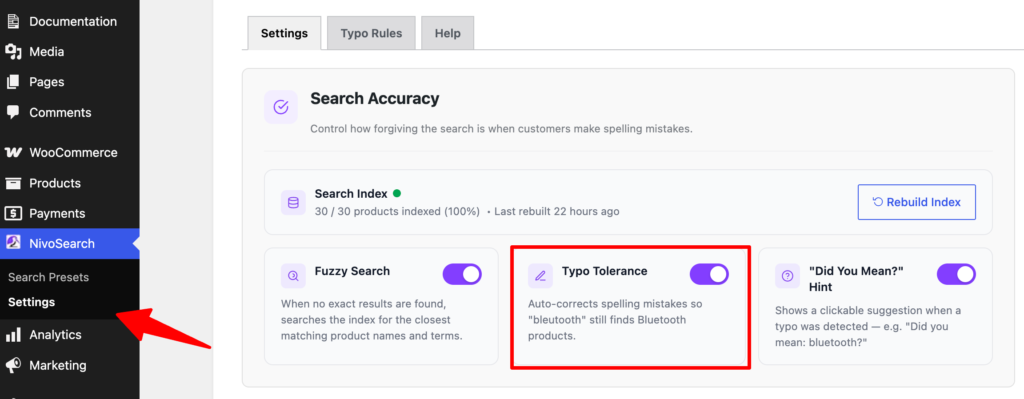
What Is Typo Tolerance?
Typo Tolerance automatically corrects common spelling mistakes before searching your WooCommerce products.
For example:
| Customer Types | NivoSearch Searches For |
|---|---|
| bleutooth | bluetooth |
| headfones | headphones |
| samsng | samsung |
| wirless | wireless |
The correction happens automatically, so customers can still find the products they’re looking for without correcting their spelling.
Using Custom Synonyms
In addition to spelling corrections, you can create your own rules for alternative words your customers may use.
Each rule follows a simple format:
Misspelling → CorrectionFor example:
| Customer Types | Search For |
| tv | television |
| cellphone | smartphone |
| tee | t-shirt |
| airpod | airpods |
When a customer searches using the word on the left, NivoSearch automatically searches using the word on the right.
This is useful for abbreviations, product nicknames, brand-specific terms, and alternative product names.
Built-in Typo Rules
NivoSearch includes 511 built-in typo correction rules covering many common eCommerce spelling mistakes.
These rules work automatically after activating the plugin. No setup is required.
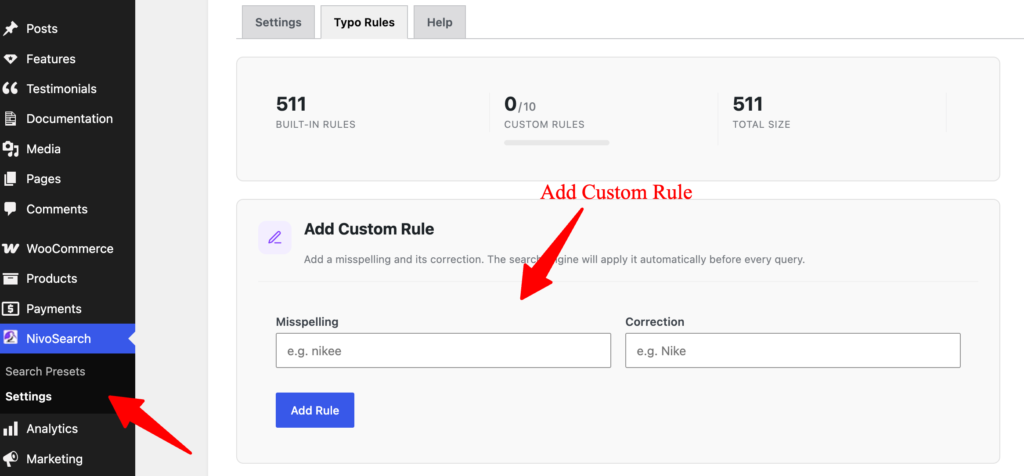
Add Your Own Rules
You can create your own correction rules from:
NivoSearch → Typo Rules
Simply enter:
- Misspelling
- Correction
For example:
iphon → iphoneor
tee → t-shirtClick Save, and the new rule will be used automatically during future searches.
Custom Rule Limit
The free version of NivoSearch allows you to create up to 10 custom typo or synonym rules.
The built-in 511 typo correction rules are always available and do not count toward this limit.
Best Practices
For the best search experience:
- Keep Typo Tolerance enabled.
- Add rules for your brand names.
- Add common abbreviations used by your customers.
- Add alternative product names that shoppers frequently search for.
A few custom rules can significantly improve product discovery and reduce failed searches.